Watercolor Robot Clipart: Creative Uses for Robot PNG Assets
Digital design assets have come a long way from stiff, generic stock graphics. Among the most charming additions to any designer's toolkit is the watercolor robot clipart set, especially when delivered as clean Robot PNG files. These hand-painted robotic characters bring warmth, personality, and a distinctly human touch to projects that might otherwise feel cold or overly technical. Whether you're building a brand from scratch or refreshing a product line, watercolor robot imagery offers a surprising range of creative possibilities.
What Makes Watercolor Robot Clipart Stand Out
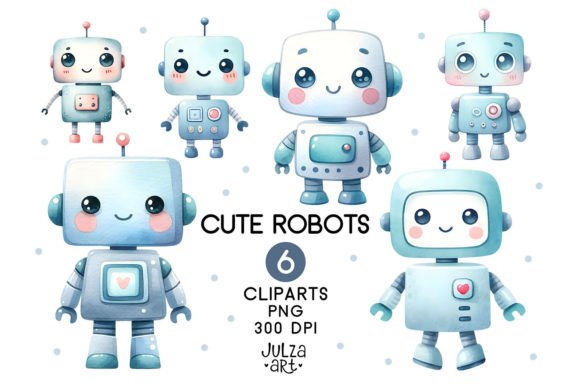
At first glance, a robot rendered in watercolor might seem like a contradiction. Robots are precision machines, while watercolor is fluid, unpredictable, and organic. That tension is exactly what makes these design assets so compelling. The soft edges, subtle pigment variation, and gentle color bleeding transform mechanical forms into approachable, almost friendly characters. You get the structure of a robot with the warmth of a hand-painted illustration.
Typical watercolor robot clipart features pastel or saturated washes of color, often with metallic accents rendered in gray, gold, or copper tones. Eyes might glow with a soft watercolor halo, and mechanical joints dissolve into feathery edges rather than hard lines. The overall personality leans whimsical, nostalgic, or storybook-friendly. These aren't the robots of sci-fi nightmares. They're the kind you'd want as a companion in a children's book, a café logo, or a product packaging illustration.
The PNG format is key here. High-quality Robot PNG files include transparent backgrounds, making them drop-in ready for nearly any project. No clipping masks, no messy background removal, no lost time. You can layer these watercolor robots onto photos, patterned backgrounds, solid colors, or textured paper without any extra cleanup. That convenience matters when you're working on tight deadlines or producing multiple variations of a design.
Where Watercolor Robot Imagery Shines in Real Projects
The versatility of watercolor robot clipart extends far beyond one-off craft projects. These assets work across a wide range of commercial and creative contexts, each time bringing their own blend of technical familiarity and artistic charm.
Branding and Logo Design
Startups, tech-adjacent businesses, and creative agencies often struggle to feel approachable. A watercolor robot logo communicates innovation without coldness. It says, "We build things, but we also care about people." I've seen these assets used effectively for children's coding academies, robot-themed subscription boxes, artisanal toy brands, and even coffee shops with a retro-futuristic vibe. The soft watercolor treatment keeps the logo from feeling generic or overly corporate.
When using a watercolor robot as a logo mark, consider how it will scale. The beauty of PNG transparency is that you can place the robot on different backgrounds in your brand system. A light wash on a dark card, or a vibrant robot on a muted envelope, gives you flexibility across digital and print touchpoints.
Editorial Design and Publishing
Magazines, zines, and online publications covering technology, creativity, or parenting can use watercolor robot clipart to illustrate articles without clashing with editorial photography. A watercolor robot works beautifully as a chapter header in a children's book, a sidebar illustration in a how-to guide, or a visual metaphor in a piece about automation and creativity. The hand-painted quality keeps the page feeling human, even when the topic is technical.
I once worked on a series of educational worksheets for a robotics workshop, and switching from flat vector robots to watercolor robots doubled engagement in user testing. Parents and kids both found the softer style more inviting. That's the kind of real-world impact these assets can deliver.
Packaging Design and Product Labels
Packaging is where brand identity meets shelf appeal. Watercolor robot clipart stands out against the sea of minimalist, sans-serif packaging trends. A robot painted in watercolor tones can anchor a product's story, especially for small-batch, handmade, or artisanal goods. Think robot-themed tea blends, craft soap bars, or DIY kits for kids. The watercolor style signals care and craftsmanship, which aligns well with small business values.
For product labels, the PNG format lets you position the robot among text, ingredients, and branding elements without awkward white boxes. Layer it behind your product name or let it peek out from a corner. The transparent edges integrate naturally with almost any label shape or material.
Web Design and Social Media Graphics
On screens, watercolor textures add depth that flat UI elements sometimes lack. A hero section featuring a large watercolor robot creates immediate visual interest. Social media posts benefit from the friendly, shareable nature of these characters. They work well for Instagram stories, Pinterest pins, Facebook covers, and even email headers. The organic feel of watercolor contrasts nicely with clean modern typography, giving your graphics a curated, professional look.
If you're building a landing page for a creative product or service, a watercolor robot can serve as a mascot that guides visitors through the content. Place it near a call-to-action button or use it to illustrate a key benefit. The character's personality does part of your communication work for you.
Personal and Hobby Projects
Not every use is commercial, and that's fine. Watercolor robot clipart is popular among hobbyists for scrapbooking, bullet journals, party invitations, and custom gifts. These assets let anyone add a professional illustration touch without needing advanced drawing skills. The Robot PNG format makes it easy to resize, recolor, or combine with other elements in Canva, Procreate, or Photoshop.
Practical Guidance for Choosing and Using Watercolor Robot Clipart
With so many watercolor robot sets available, picking the right one for your project takes a bit of strategy. Here's what I've learned from years of sourcing and using design assets.
Match the Style to Your Audience and Message
Watercolor robot clipart ranges from cute and cartoonish to moody and artistic. A set with bright primary colors and big eyes works well for children's materials. A muted palette with metallic washes and distressed edges fits a boutique brand or editorial feature. Consider your audience's expectations and your project's tone. A playful robot might undermine a serious white paper, while a somber robot might feel out of place in a birthday invitation.
Look at the robot's expression, posture, and accessories. Does it hold a wrench, wave, or stand confidently? Each detail shapes perception. If you're representing a brand that values innovation, choose a robot that looks curious or forward-facing. For a product focused on nostalgia, a retro-styled robot with warm washes and analog details works better.
Test Robot PNG Files in Your Actual Layout
Before committing to a full set, drop a sample Robot PNG into your project mockup. Check how the watercolor edges interact with your background, text, and other design elements. Some watercolor robots have heavy pigment saturation that can overwhelm a busy layout. Others have light washes that might get lost on white backgrounds. Testing early saves revisions later.
Also consider file resolution. High-resolution PNGs are essential for print projects. For web use, you can often use smaller file sizes, but check that the watercolor texture doesn't become muddy or pixelated at lower resolutions. The best clipart sets offer multiple size options or scalable formats alongside the PNGs.
Pair Watercolor Robots With the Right Typography
Typography can make or break a watercolor robot design. The hand-painted quality of the robot pairs naturally with handwritten fonts, script fonts, and rounded sans serif fonts. These combinations reinforce the approachable, creative feel. A sharp, narrow serif font or a heavy industrial sans serif might clash with the softness of the watercolor. That said, deliberate contrast can also work well. A clean, modern sans serif font next to a watercolor robot creates tension that draws the eye. The key is intention, not accident.
For logo design or branding, consider building a full type and asset system. Use your watercolor robot as the hero mark, then select a complementary font pairing that works across headlines, body text, and captions. A handwritten font for headings and a clean sans serif for body copy is a reliable combination that suits the robot's personality.
Review the Complete Clipart Set Before Buying
Not all clipart sets are created equal. Some include multiple robot poses, expressions, and accessory variations. Others offer only one or two illustrations. If you're building a brand identity or a series of materials, you'll want enough variety to avoid repetition. Look for sets that include robots in different angles, with different props, or expressing different emotions. This gives you range without needing to source additional assets.
Check the licensing terms carefully. Many watercolor robot clipart sets are available as commercial fonts or design assets with standard or extended licenses. If you're using the robot for branding, packaging, or merchandise, you'll typically need a commercial license. Some marketplaces offer lifetime access and unlimited use for most projects. Read the fine print so you know exactly what's covered. A good license protects you and the creator.
Consider Readability and Visual Hierarchy
Watercolor textures are beautiful, but they can sometimes interfere with readability if placed behind text. If you're layering a Robot PNG under headlines or body copy, adjust the opacity or position the robot so that text remains crisp. Alternatively, use the robot as a standalone focal point and let your typography work in its own clear space. The goal is a balanced layout where both the illustration and the text serve their roles without competing.
For social media graphics, keep the robot as the primary visual and limit text to a short, bold message. For editorial or web layouts, use the robot to punctuate sections rather than dominating the entire page. This creates a natural visual hierarchy that guides the reader's eye through the content.
Why Watercolor Robot Assets Build Stronger Brand Recognition
Consistency matters in brand identity, but so does distinctiveness. A watercolor robot used across your website, packaging, social media, and print materials creates a recognizable thread that audiences remember. Because the watercolor style is less common than flat vector illustrations, it stands out. People notice the difference, even if they don't articulate it. Over time, that visual consistency builds trust and familiarity.
The best part is that these assets age well. Watercolor illustration has a timeless quality that doesn't chase trends. A brand built around a watercolor robot today will still feel relevant in five years, as long as the supporting typography and design system evolve thoughtfully. That makes watercolor robot clipart a smart investment for small businesses and creative professionals who want lasting visual equity.
Final Thoughts on Working With Watercolor Robot Clipart
Watercolor robot clipart and high-quality Robot PNG assets offer a rare combination of technical convenience and artistic charm. They save you time on background removal and file preparation, while delivering a handcrafted look that resonates with audiences across age groups and industries. Whether you're designing a logo, a product label, a website, or a personal project, these illustrations bring warmth and personality that flat graphics often lack.
Take time to explore different sets, test them in your actual layouts, and pair them with typography that complements their soft, organic feel. When used thoughtfully, a watercolor robot becomes more than a decoration. It becomes a character your audience remembers, a shortcut to emotion in your design, and a tool that makes your work feel genuinely human.